


PhotoLesa's photography gear provided by:







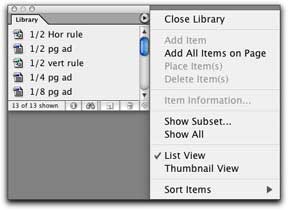
A library is a place to hold frequently used elements. This could include things like horizontal and vertical rules used as design elements, pre-formatted picture box holders for headshots and ads, a pre-formatted table... just anything that you use over and over within a document.
Step 1: From the File menu, choose New > Library.
Step 2: Give it a name associated with your document, and save it.
Step 3: To add new items, use the Selection Tool (darkened arrow) to select them, then drag and drop them into the Library. Give each element a name you’ll remember when prompted.
By clicking the fly-out menu at the top right, you can access other options such as how to view the list of elements.
Step 1: To use an item, simply choose Open from the File menu, and navigate to your Library file.
Step 2: Drag and drop library items to your document and edit them at will.



PhotoLesa's photography gear provided by:
 ©Copyright 2004-2026 Lesa Snider